Add White Background to Photos





How to add white background to photo?
Follow these three easy steps to quickly create spotless white backgrounds for your photos.
Upload Your Photo
Click Upload or drag and drop your photo into ClipSnap. Supports JPG, PNG, and WEBP formats at full resolution.
Remove Original Background
The AI automatically detects your subject and precisely removes the background.
Add a White Background
Select the White Background option to instantly fill the transparent area. Download your image in high resolution.
Perfect Uses for White Backgrounds
Create clear, distraction-free visuals for your business, profile, or creative projects.

Features of the ClipSnap White Background Tool
AI Precision
Automatically detects your subject and applies a perfect white background with crisp edges.
One-Click Background Change
Quickly change any photo background to white with a single easy step.
Commercial Use Allowed
Use your images freely for personal branding, business content, or commercial design projects.
Privacy and Data Security
Your images are fully protected with encrypted transfers and strict privacy standards.
Works on Any Device
Use the White Background tool on desktop or mobile without needing to install any software.
Free and Fast
Add white backgrounds instantly for free, with no signups or hidden limits.
Ideal for E-Commerce
Create professional marketplace product photos for Amazon, Shopify, or Etsy with clean white backgrounds.
Wide Format Compatibility
Support JPG, PNG, and WEBP popular formats to meet any creative requirement.
Make your background white in seconds.
ClipSnap's AI White Background tool instantly transforms your photos, making them look crisp, polished, and professional. Whether you're working on product listings, profile pictures, or marketing visuals, you can remove, replace, and refine your background with just one click—no design skills needed.

Perfect for Products and Portraits
Showcase your products, people, or creative projects against a clean white background that enhances clarity and focus. Perfect for e-commerce stores, marketplaces, catalogs, and social media, your images remain consistent, high quality, and ready for any platform.
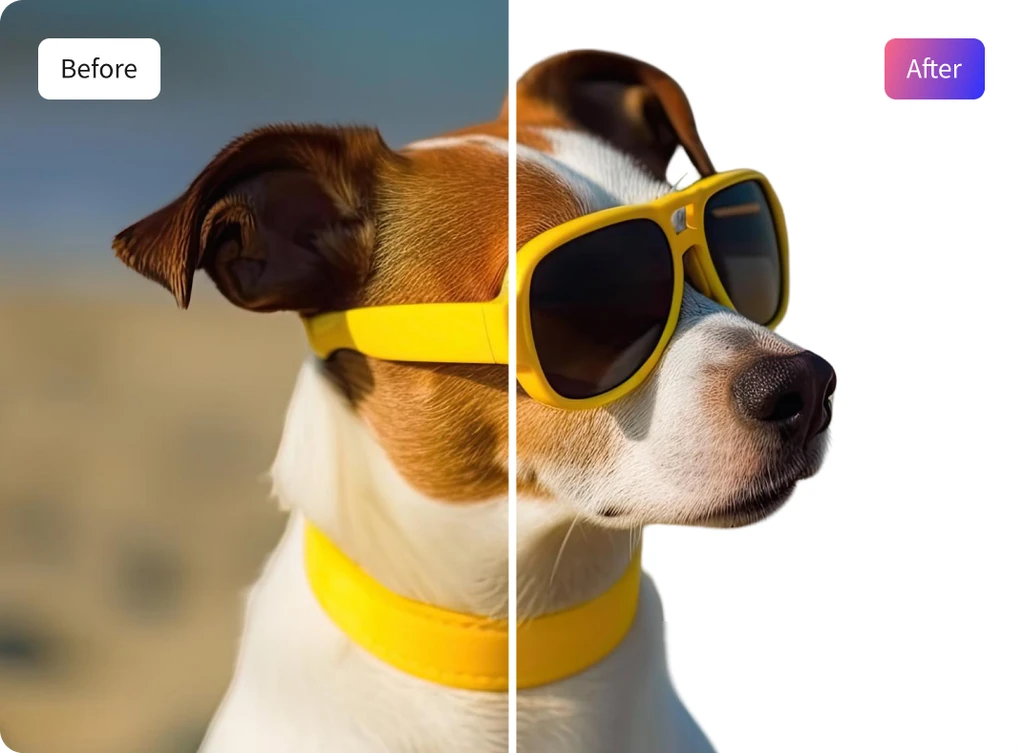
Create High-Quality Images That Sell
Transform casual photos into professional, studio-quality product shots that drive sales. Upload your image, and ClipSnap's AI automatically removes the background, replacing it with a smooth, white backdrop. Keep details sharp and colors true-to-life even when zoomed in, making your listings more trustworthy and appealing to buyers.

AI Precision for Perfect Results
Powered by advanced AI, ClipSnap intelligently detects your subject, sharpens edges, and replaces the background with smooth white tones for perfect balance. The result is clean, distraction-free visuals with consistent lighting and color accuracy, ready for websites, ads, and print.

White Background Use Cases
Create clean, professional photos for any purpose using AI.